MANAGER'S GUIDE
How do you track missed WhatsApp calls across a sales team?
A customer who rings instead of typing is usually close to a decision. If nobody picks up and nobody goes back, the chat still looks fine, because there is no unanswered message to be late on. This guide covers what to track about missed calls, what counts as going back, and the standard and routine that get customers called back.
WhatsApp missed call tracking lists every call from a customer to a company number that nobody answered and nothing followed: no call back, no message. It names the rep whose number they rang and how long they have waited. On the WhatsApp Business app each phone keeps its own Calls tab, so the numbers are linked to one view.
THE LIST TO START WITH
Rang, and nobody went back.
Every incoming call nobody took stays on this list until something follows it: a call back, a message, or the customer getting in touch again. It sits on the Calls page, beside the count of how many there are.
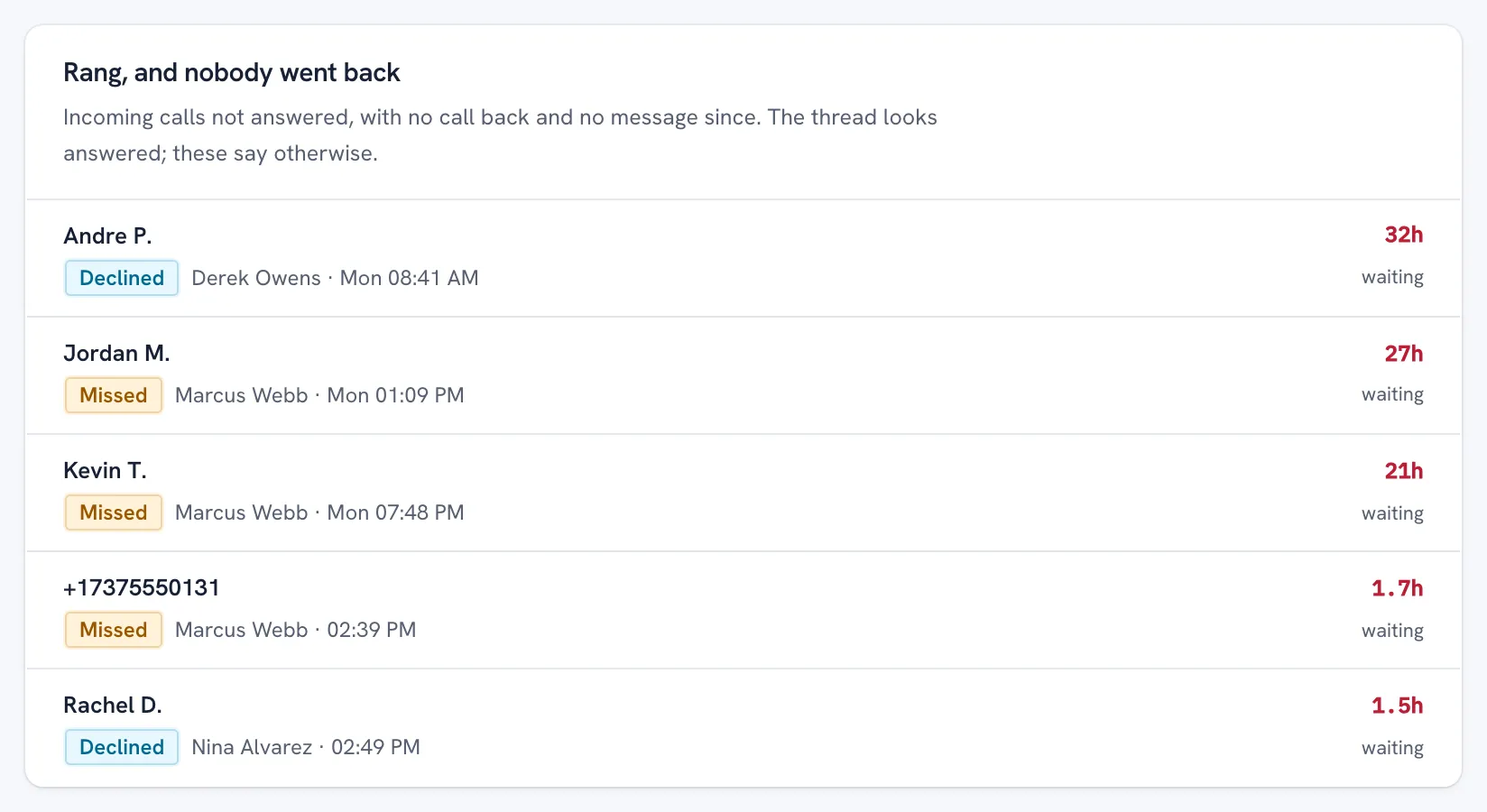
Each row is a customer, the rep whose number they rang, when they rang, and how long they have waited. Declined calls are on it as well as missed ones: either way, the customer was not answered.
The thread can look answered while the call in it is not. That is what the list is for: the customers no reply-time figure can see.
THREE WAYS TO KNOW
What each way of tracking missed calls can tell you.
A team on the WhatsApp Business app has three options. Two of them work without buying anything, and the table says where each one stops.
| Each phone's Calls tab | A log the reps keep | Numbers linked to one view | |
|---|---|---|---|
| Every number in one place | No: one list per phone | Only if every rep fills it in | Yes |
| Whether anyone went back | Only by reading each tab line by line | Only what the rep writes down | Yes: a call back, a message, or nothing |
| A message counts as going back | No: the tab lists calls only | If the rep records it | Yes |
| After the Calls tab is cleared | Gone, unless the phone was backed up | Unaffected | Unaffected: the call was seen as it rang |
| Out-of-hours calls | Not marked | If the rep notes the time | Marked against your working day |
| Relies on the rep remembering | Yes | Yes | No |
WHAT GOING BACK LOOKS LIKE
The missed call, and what followed it, in the thread.
Open a customer's thread and every call sits between the messages, in order, on the caller's side.
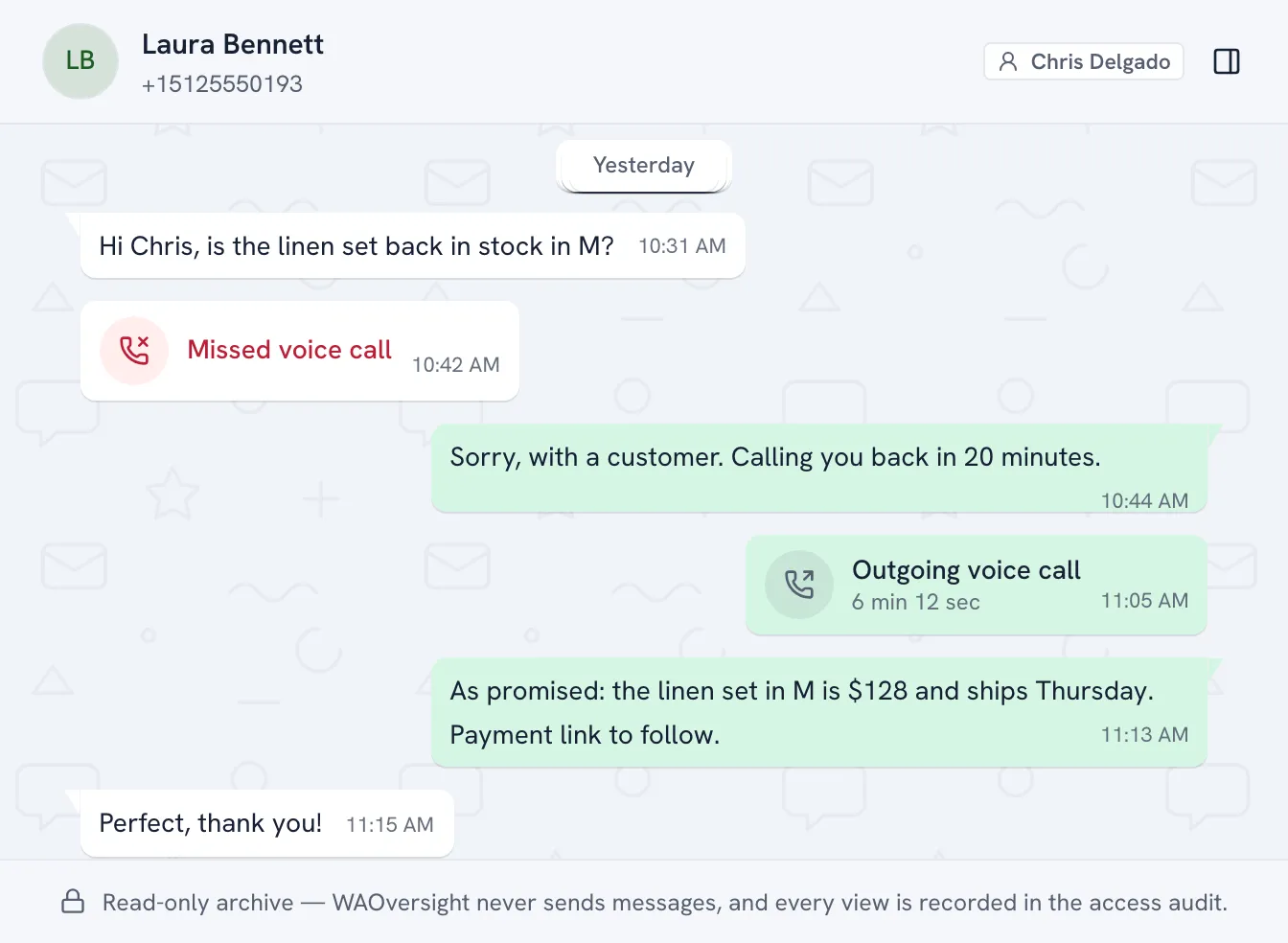
Laura Bennett asked Chris about stock and her call was missed. He wrote that he would call back, then did: the outgoing call and its length are in the record, before the quote that followed.
Nobody had to report it. The call back is in the record because it happened on the company number.
Why missed calls slip through
Typing is the easy way to reach a business. A customer who rings has chosen the harder way, usually because the question is long, the decision is close, or they want an answer before they ask somebody else.
A missed call leaves nothing to be late on. The chat holds no unanswered message, so every reply-time figure reads the conversation as fine, and on the WhatsApp Business app the call itself sits in the Calls tab of 1 phone. What WhatsApp keeps about a missed call, and why it cannot be exported, is set out with its sources in our post on who calls the customer back.
The 4 numbers worth tracking
- Missed incoming calls. Calls from a customer that nobody answered: missed, declined or unavailable. A declined call counts, because the customer was not answered.
- Nobody went back. Of those, the calls with nothing after them, by customer, with the rep whose number they rang and how long they have waited. This is the list a manager works from.
- Replied within. The median time from a missed call to the first call back or message, and the share of missed calls that got a call back. Read it as a trend, never as a verdict on 1 week.
- Out of hours. Missed calls outside the working day you set. They say more about cover than about any one rep.
Read each rep's missed calls beside their calls in. A high count on the busiest number is a question about load before it is a question about the rep.
What counts as going back
Decide this before you count anything, and decide it the way the customer would: did they hear back from your side?
- A call back from any company number counts, whether or not the customer picks up. They now have a missed call from you, and the call back is logged with its own outcome.
- A message from the rep in the chat counts. "Sorry I missed you, can I call at 3?" is an answer, and it is in writing.
- If the customer rings again or writes first, the old call comes off the list. Their newest contact is the one to answer now.
- A call back on an ordinary phone line is not seen, because only WhatsApp calls on linked numbers are. A short WhatsApp message after it clears the call and puts the details in writing.
Setting it up, in 5 steps
The order matters: the team hears about it before any number is linked, and the standard is agreed before anyone is measured against it.
- Put each rep on a company-owned number. Missed calls can be tracked only on numbers the company controls. A rep's own WhatsApp is never linked. Why the number should be the company's, and how to move a team across.
- Tell the team in writing. Before any number is linked, say which numbers are covered and what a manager can see. The page for your reps does this for you.
- Link each number with 1 QR scan. From the company phone, under Linked devices. Every WhatsApp call on the number is logged from that moment. How the link works, step by step.
- Agree the standard. For example: every missed call from a customer gets a call back or a message within 1 working hour. A call that comes in out of hours is answered in the first hour of the next working day. A message counts, which is what makes the rule keepable from a meeting or a car.
- Work the list every morning. Oldest first, each call to the rep whose number was rung, and each rep's figures once a week.
Nothing is installed on the phones, so an iPhone and an Android phone are covered the same way, and reps keep calling and messaging from the WhatsApp Business app. Incoming calls are seen as they ring, so clearing a phone's Calls tab clears the phone, not the record.
Daily, weekly, monthly
- Every morning. Open the list, oldest first. Overnight and weekend calls are on it, and the out-of-hours filter shows them on their own. Hand each one to the rep whose number was rung: the call back comes from the company phone, as it always has.
- Every week. For each rep: calls in, missed incoming, the customers still waiting, and how fast they went back. Then look at the hours before the people. The Calls page's weekday-by-hour grid shows where missed calls bunch up.
- Every month. The trend in time to go back and in the share of missed calls returned by phone. An evening cluster that is still there a month later is a rota question.
The list is a to-do list, not a scorecard. Read as a to-do list, it gets customers called back. Read as a scorecard, it teaches a team to send "missed your call" and change nothing else.
Calls and messages are one question
A customer who rang and heard nothing and a customer who wrote and heard nothing are the same problem: somebody reached out and was met with silence. One standard should cover both.
Unanswered messages are the list of customers still waiting for a reply, ranked by how long. A missed call stays on the Calls page until somebody goes back. The two meet in both directions: a call back that connects ends a customer's wait for a reply, and SLA tracking counts it as an answer.
Missed calls in the queue
The list is there when you look. To have missed calls come to you instead, put them in the queue.
- A rule. A rule can fire on a call: from the customer, missed, for example. It raises an item for each one, or starts a deadline, within about 15 minutes. A call with no conversation behind it raises nothing.
- Nora. With Nora switched on (it runs on your own AI key, on customer threads only), a missed call from a customer makes Nora read the thread, and a call the rep offered and the customer agreed to is held as a promise until the rep makes it.
- Escalation. A missed call a rule or Nora has raised is a queue item like any other, so you can escalate it to the rep, with reminders while nobody acts on it.
What this does not do
- It does not record calls or transcribe them. There is no audio and no setting that adds it. What each call record holds is on the call-tracking page.
- It sees WhatsApp calls on linked company numbers only: not ordinary phone calls, and never a rep's own WhatsApp.
- It never calls or messages anyone. There is no automatic "sorry we missed you": going back is the rep's, from the company phone.
- A call back made a moment ago may not have cleared the list yet. Outgoing calls arrive from the phone's own call log, usually within minutes.
- It covers each number from the moment it is linked, not before.
QUESTIONS
What managers ask about missed WhatsApp calls
How do I track missed WhatsApp calls across my sales team?
Link each company-owned WhatsApp Business number to one management view with 1 QR scan. Every incoming call nobody answered is then logged, and the ones nobody went back to, with no call back and no message since, are listed by customer, with the rep whose number they rang and how long they have waited.
What is WhatsApp missed call tracking?
A record of every WhatsApp call a customer made that nobody answered, and of what happened next: a call back, a message, the customer trying again, or nothing. The part a manager needs is the last one, the customers nobody went back to.
How fast should a missed WhatsApp call be returned?
Set your own standard and measure it. One a busy team can keep: a call back or a message within 1 working hour, and a call that came in out of hours answered in the first hour of the next working day. A message counts, because the customer heard back.
Should we send an automatic message after a missed WhatsApp call?
An automatic message tells a customer the call was seen. It is not an answer, and it does not tell you whether anyone went back. WAOversight never sends from a company number, so it does not automate the reply: it shows you which customers are still waiting for one.
Can I see missed calls on my reps' numbers without the WhatsApp Business API?
Yes. The numbers stay on the WhatsApp Business app on company phones and are linked as companion devices, the way WhatsApp Web is. Nothing is installed on the phones, and reps call and message exactly as before.
My team will think I don't trust them.
Then tell them, which you have to do anyway. Nothing here is hidden from your team: they are told which numbers are archived and why, before you link one. Your own reading is on the record too, because every manager view is written to an access log that your workspace owner and your auditors can read, and that nobody can edit or switch off. Send them our employee page before you roll it out.
Find the customers nobody went back to.
Link one company number on a 15-minute call. Missed calls are listed from the first one that rings.
WAOversight is an independent product and is not affiliated with or endorsed by WhatsApp or Meta.