CALLS
WhatsApp call tracking: every call on a company number, logged.
A rep who moves a hard conversation to a call used to vanish from every response number. Now the call is in the record: who called whom, whether anyone picked up, how long they talked, and which customers rang and never heard back.
WAOversight logs every WhatsApp voice and video call on a linked company number: the direction, whether it connected, was missed or was rejected, how long it ran or, when we saw it ring, the time to pick up. It never records audio and installs nothing on the phone. Missed calls that nobody returned are listed by customer name.
THE CALLS PAGE
Every call on every company number, on one page.
Calls sits under Monitor, beside Conversations. It counts every call live, in your workspace's time zone. Its heatmap, breakdowns and tables are filters: press an hour, a result or a rep and the whole page narrows to those calls.
Filter by rep, number, direction, result, follow-up, customer or not, length, voice or video, group or one to one, and working day or out of hours. The filters live in the address, so a narrowed view travels as a link.
Search a name, a number or a group to find every call with them. It searches who was on the call, never what anyone wrote.
Export CSV downloads exactly the calls your filters select, as facts: who, when, which number, the result, the length and what happened next. The export is written to the access audit, like every other read.
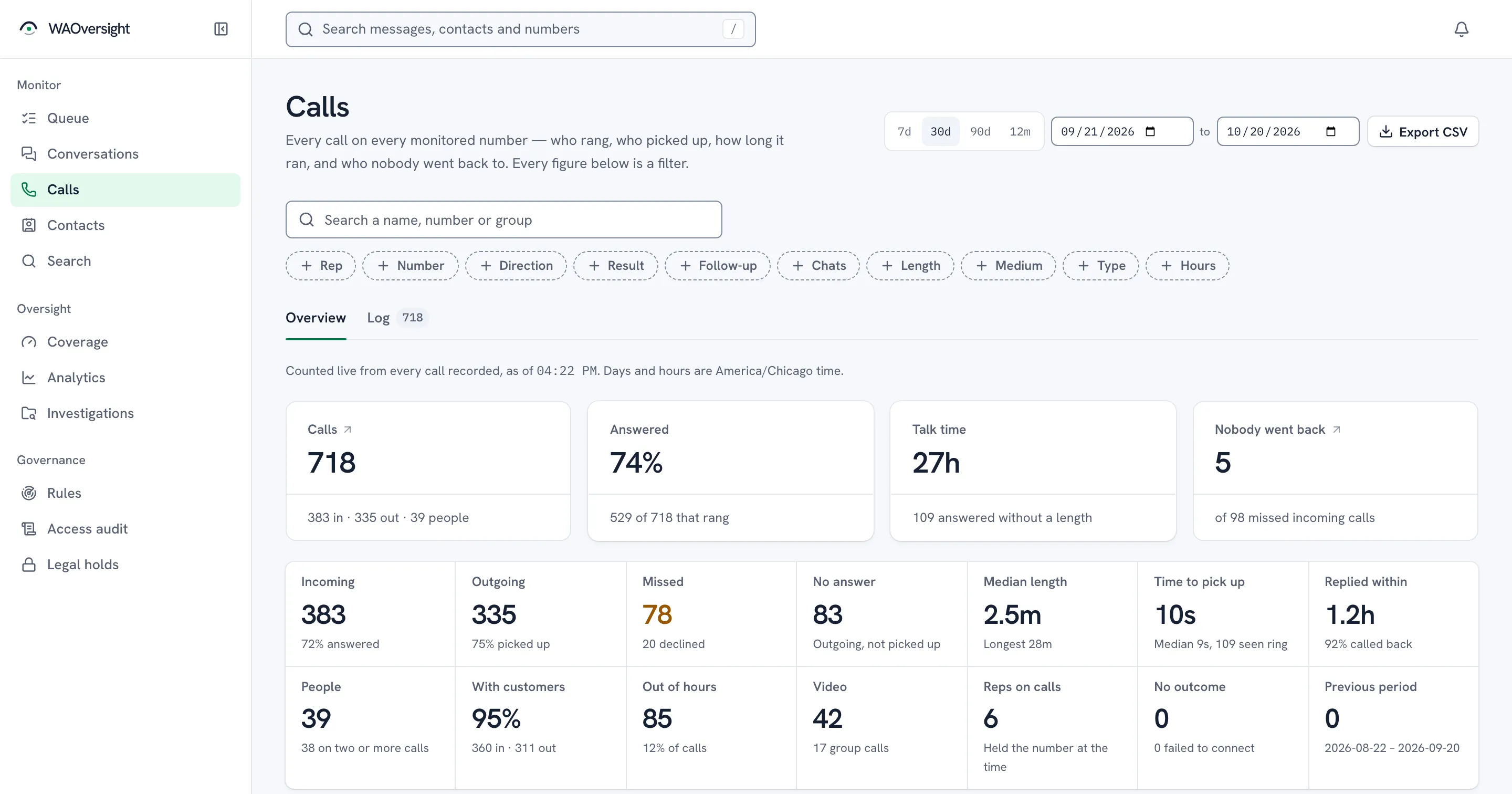
- Every filter travels in the link
- Missed, never returned
WHAT IS LOGGED
What the record holds for each call, and what it never will.
Two sources feed one row per call. The handset's own WhatsApp call log decides direction, outcome and duration when it reports the call; the live ring decides time to pick up, and the outcome when it does not. Neither carries a word of what was said.
| What it is | Captured | |
|---|---|---|
| Direction | Incoming or outgoing, from WhatsApp's own call log on the handset. | Logged |
| Outcome | Connected, missed, rejected, cancelled, answered on another of the rep's devices, or failed. | Logged |
| Duration | Talk time in seconds, from the call log. An incoming call we watched ring live and the rep answered never gets a length, and the calls page counts those. | When logged |
| Time to pick up | Ring to answer, for the calls we watched ring live. Not available for a call we learned about only from the log. | When seen |
| Voice or video | Whether the camera was on. | Logged |
| Out of hours | Whether the call fell outside the working day you set for the workspace. | Logged |
| Group calls | Counted once, against the company number that held the call. | Logged |
| Audio or transcript | Never captured. There is no recording and no setting that adds one. | Never |
WHEN CALLS HAPPEN
The hours your customers ring, and who picks up.
A weekday-by-hour heatmap of every call in the range, with your working day marked. Switch it to incoming, outgoing, missed incoming, answer rate or talk time.
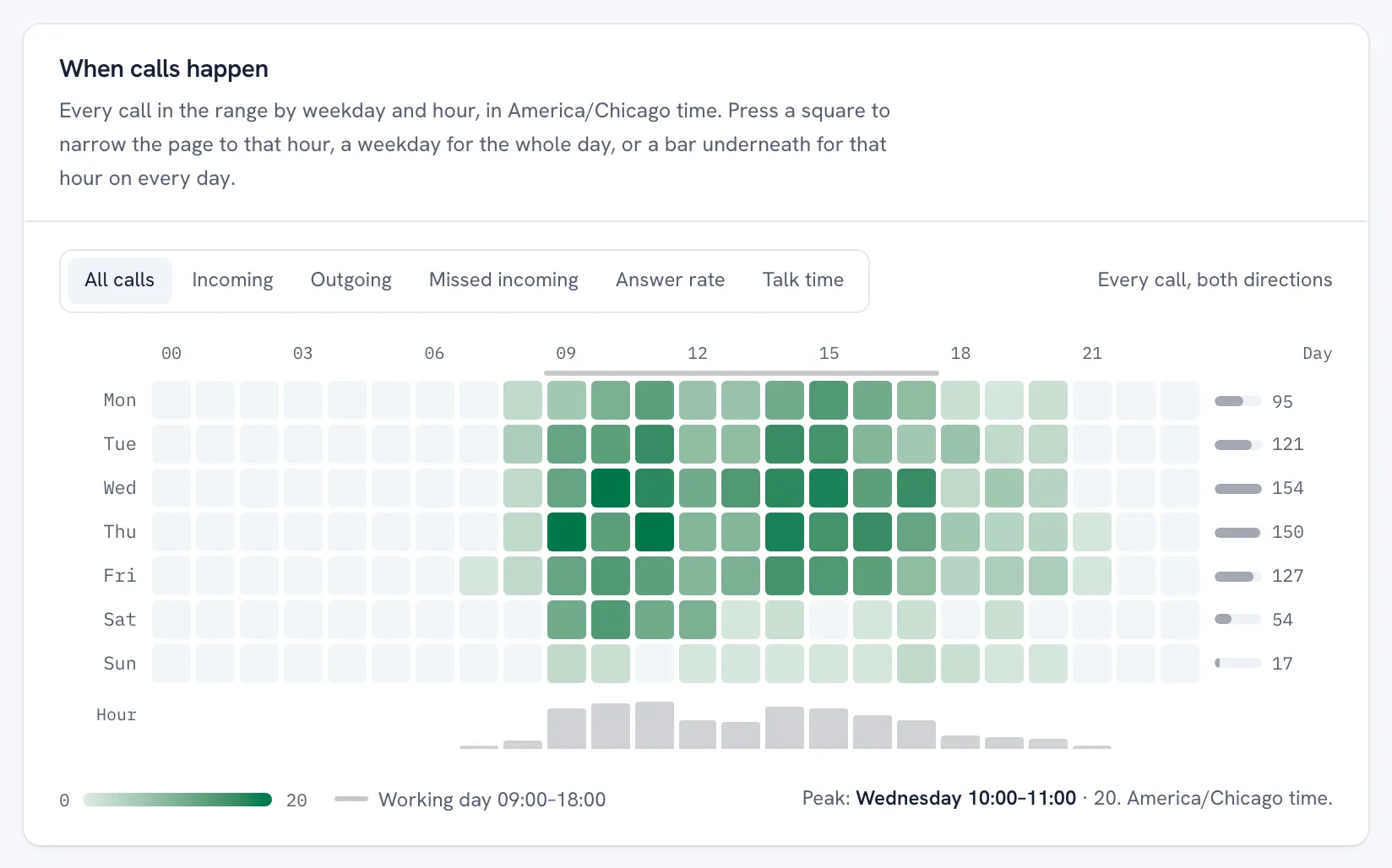
Press a square and the page narrows to that hour on that weekday. Press a weekday for the whole day, or a bar for that hour on every day. It works from the keyboard too.
Answer rate is left blank for an hour with fewer than 3 calls, so a quiet hour never reads as perfect or as a disaster.
AFTER A MISSED CALL
The customers who rang and never heard back, by name.
Every incoming call that was missed, declined or unavailable is sorted by what happened next: called back, messaged instead, they got in touch again, or nobody went back.
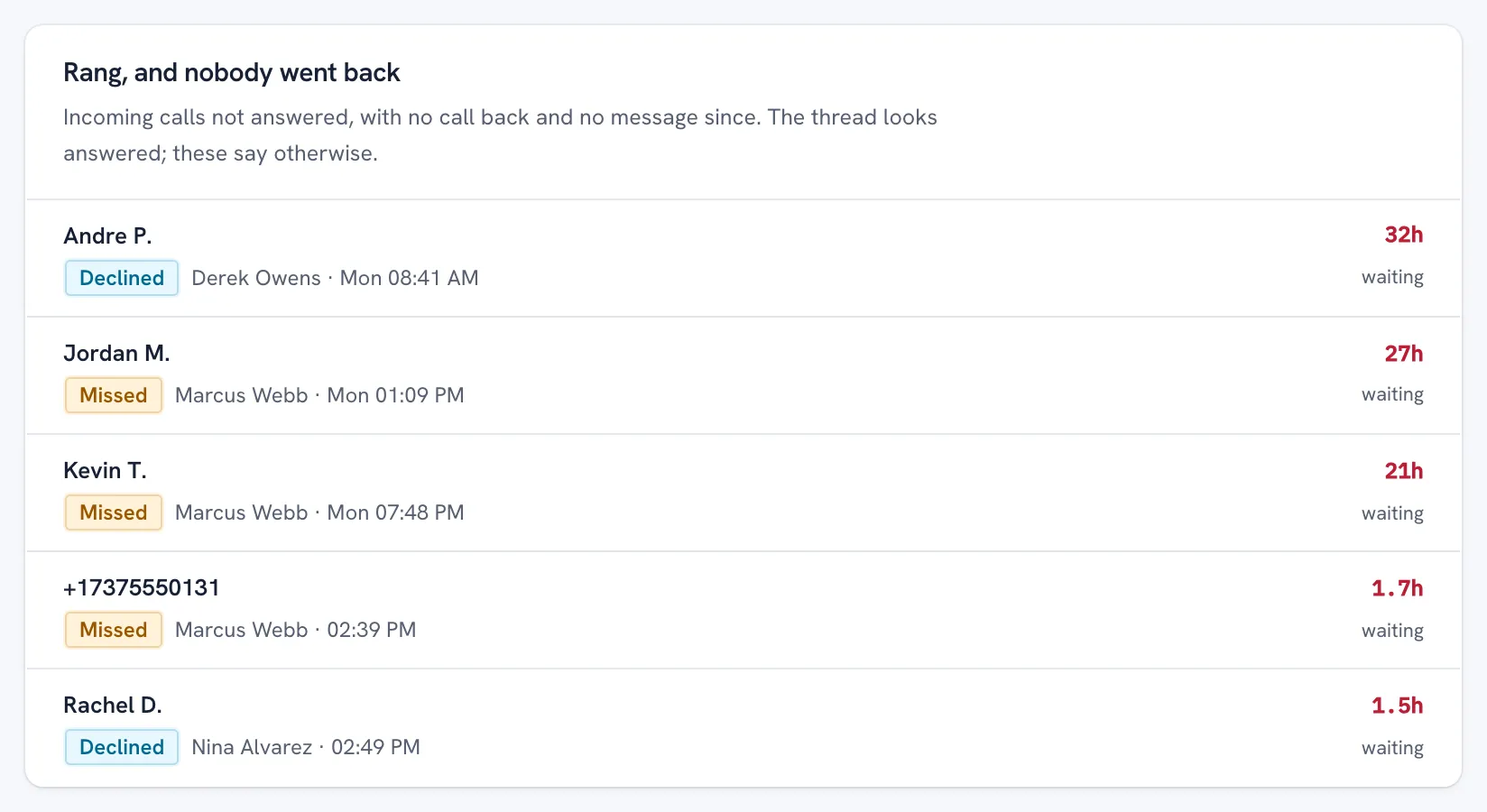
The list shows who rang, which rep's number they rang, and how long they have waited. A call back from any rep counts, and so does a message in the thread.
A thread can look answered while a missed call in it is not. Andre P. was declined on Derek's number and Jordan M.'s call to Marcus went unanswered a day ago; neither has heard back, and the list says so.
PER REP
Calls, answer rate and talk time for every rep.
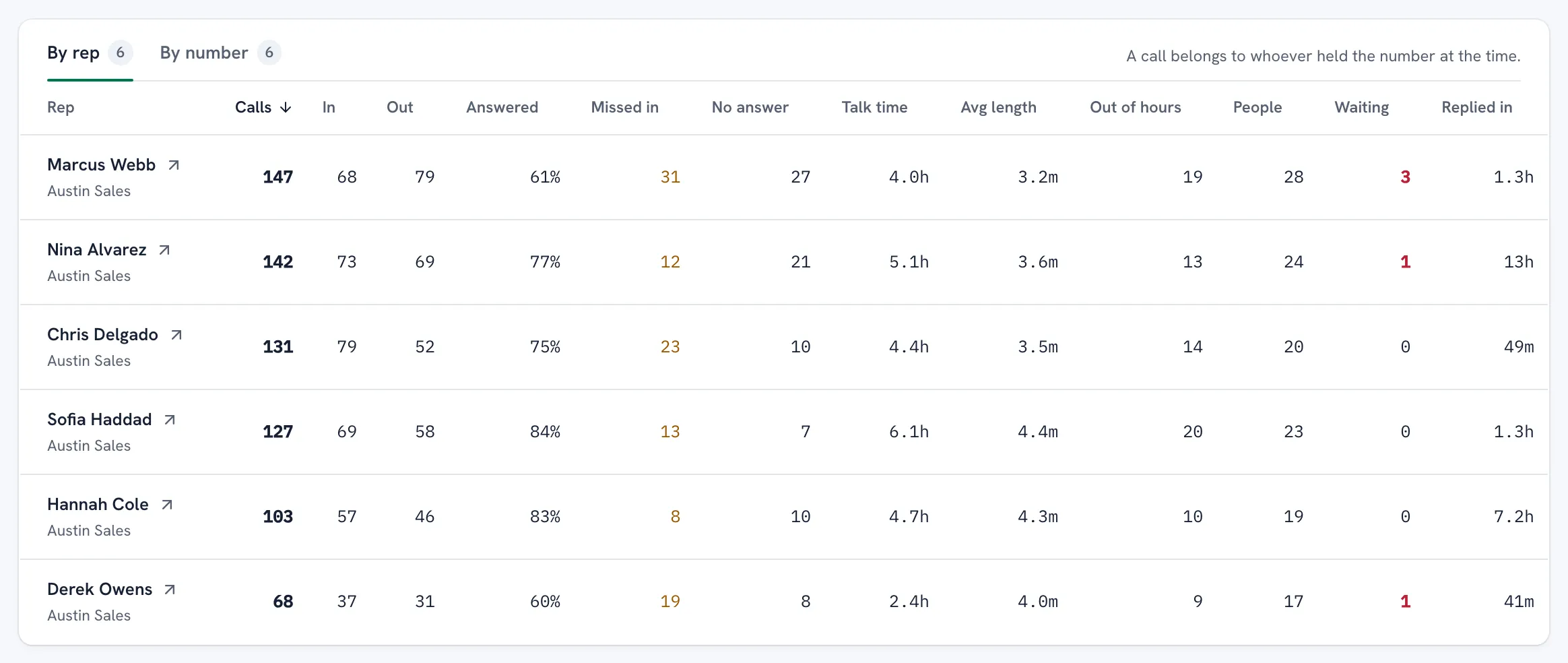
One row per rep: calls in and out, answered, missed incoming, no answer, talk time, average length, out of hours, the people they spoke to, who is still waiting on them, and how fast they went back.
A call belongs to whoever held the number at the time, so a number handed over mid-month splits correctly between the two reps.
Switch to By number for each company number and who held it, or press a rep to keep only their calls on every panel.
The rep who answers by phone rather than by text no longer looks silent: their calls sit next to everyone else's, counted the same way.
IN THE THREAD
Calls sit in the conversation, between the messages.
Open a customer's thread and every call is there in order, on the caller's side: missed, declined, outgoing, video, and how long it ran.
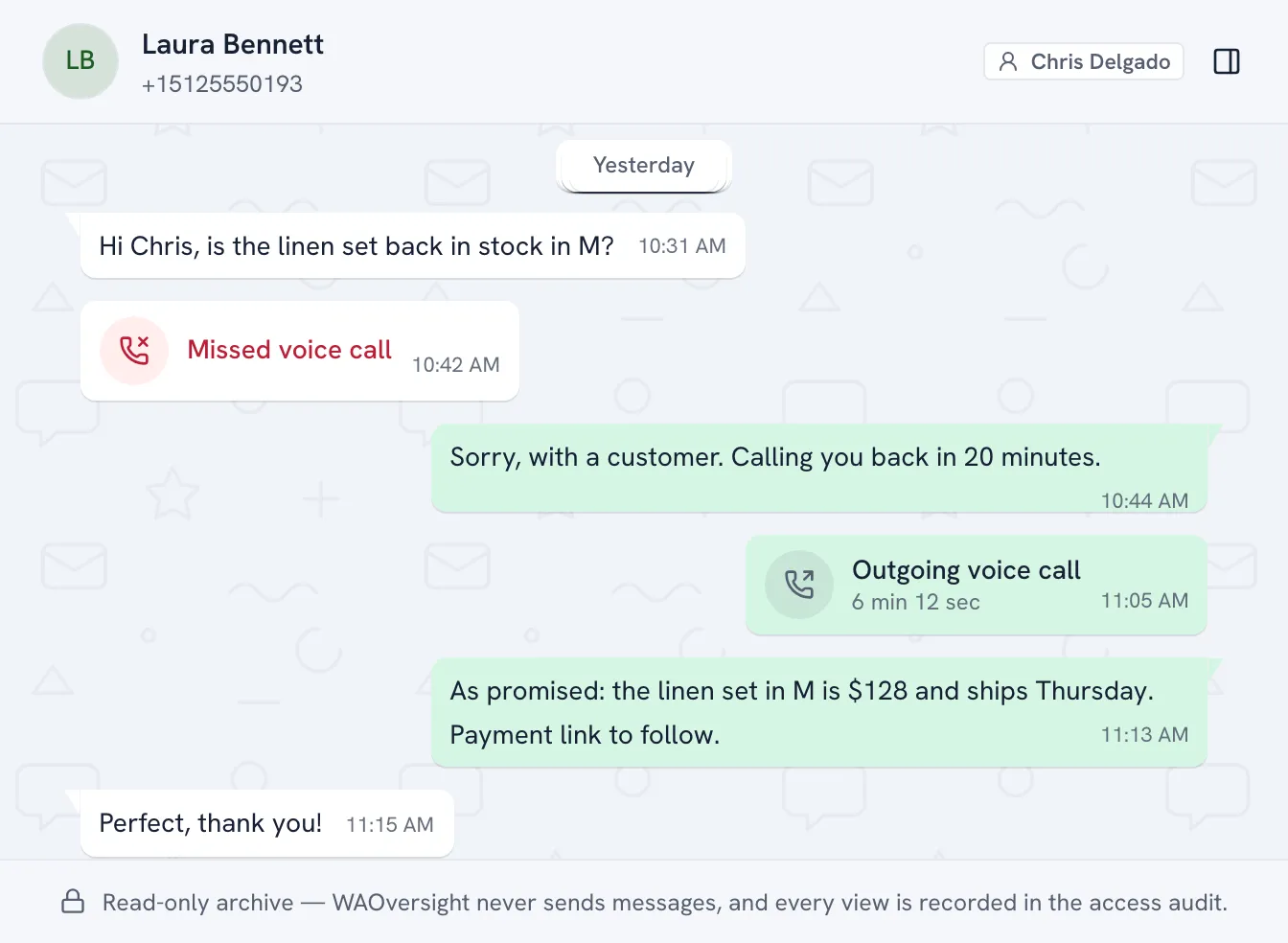
Laura Bennett asked Chris about stock, missed him on the phone, and was told he would call back. The record shows that he did, and for how long, before the quote that followed.
An answered call the phone never gave a length for says exactly that: answered, length not reported. Never a made-up zero.
ONE CALL
Open any call for its timeline and how WhatsApp recorded it.
The log lists every call, newest, oldest or longest first. Open one for when it was placed, rang, answered and ended, the rep, team and company number, and the phone's own words for the outcome.
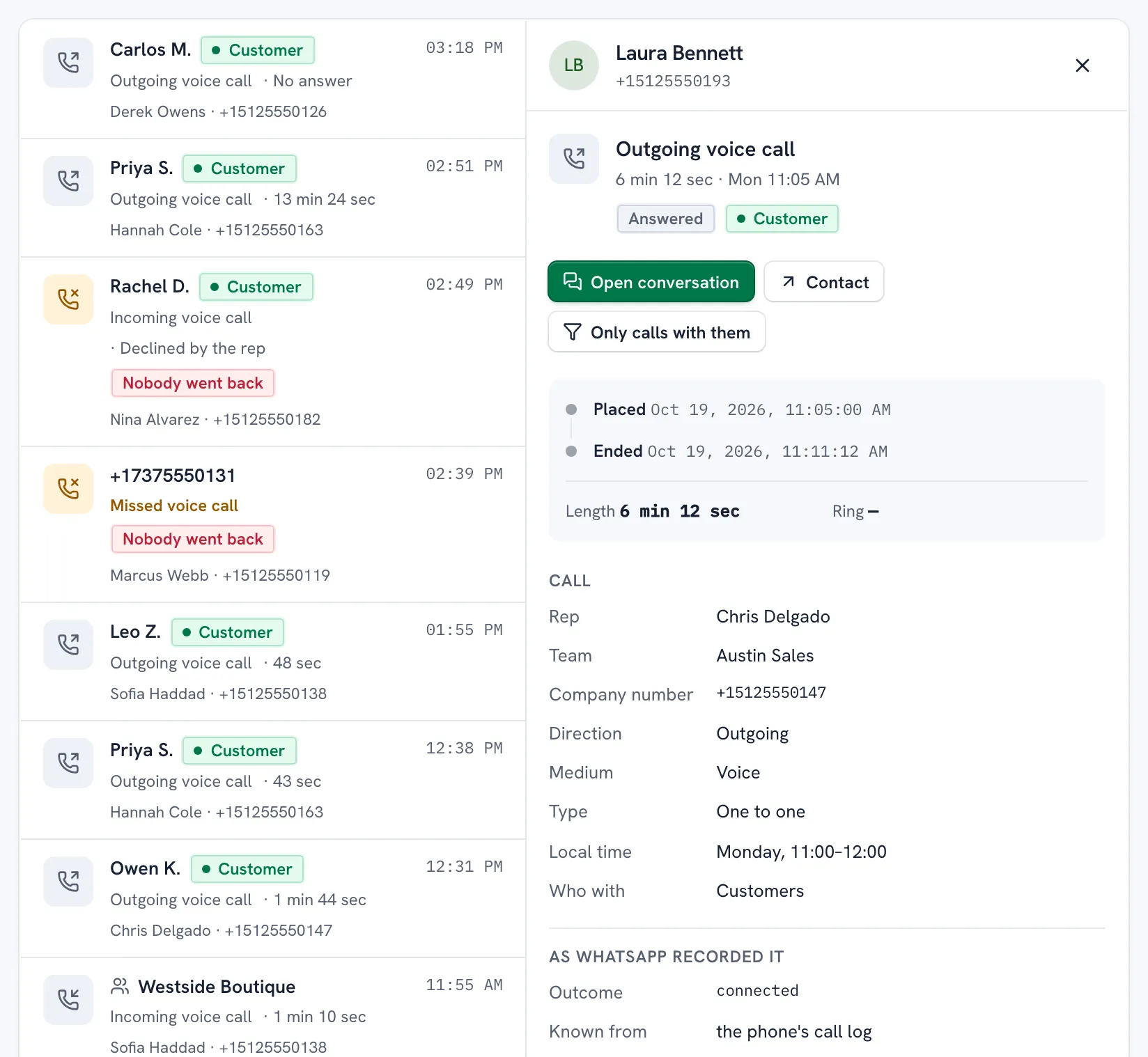
One press opens the conversation, the contact, or narrows the page to every call with that person.
Every call you open is recorded in the access audit, the same as opening a conversation.
Where the numbers come from
WhatsApp tells a linked device two different things about a call, and they are not the same thing. While a call rings, the link sees the ringing, the pickup and the hang-up in real time. That is the only source that knows the moment someone answered, so it is where time to pick up comes from. It does not know how long the call ran, and it does not reliably see a call the rep placed from the handset.
The second source is WhatsApp's own call log on the phone: the same list the rep sees under Calls. It records direction, the outcome and the duration, it covers outgoing calls, and it is the phone's verdict on what happened. It reaches us a little after the event rather than live, and only for calls the link did not see ring. So a call has one row, and where the log has a record, it wins on the three things it owns. A call we watched ring keeps the outcome the ringing showed, and if the rep picked it up on the phone, its length is never reported.
A call picked up on another of the rep's devices counts as answered. Days follow your workspace's midnight, not ours, and a call between two of your own numbers still counts in the totals.
Calls across the product
- The queue. A connected call from the rep closes a customer's wait as "Rep called", and a customer who calls in closes a no-reply item.
- Rules. A rule can fire when a call happens: from the customer, the rep or either, missed, connected or either way, and lasting at least as long as you set. It can flag the call or start a deadline. Items arrive within about 15 minutes, and a call with no conversation behind it raises nothing.
- Nora. When you switch Nora on (it runs on your own AI key, on customer threads only), a missed call from a customer makes Nora read the thread, and a call the rep offers and the customer agrees to is held as a promise until the rep makes it.
- Coverage. A call that connected counts as contact, the same as a message, so a customer the team spoke to on one is not listed as never contacted.
- Analytics and the morning digest. The Analytics overview carries the team's calls beside its messaging figures, and the digest gives each rep's calls in, calls out and talk time.
When a phone's call log falls behind
Outgoing calls, and lengths, arrive from the phone's call log. If a phone stops sending it, the Calls page says that rep's call log is behind, marks the number, and Analytics and the digest label their call figures as so far rather than final. Nothing is estimated to fill the gap. The warning can read clear for a few minutes before late calls land, and the figures catch up when they do.
No app on the phone, so it works on any phone
Call-logging apps install on each handset and, for recording, need Android. WAOversight installs nothing. The company number is linked as a companion device with one QR scan, and the call log comes through that link, so an iPhone and an Android phone are tracked identically. Your reps keep using the WhatsApp Business app on their company phones exactly as before.
What this does not do
- It does not record calls, transcribe them, or capture a word of what was said.
- It does not see calls on a rep's personal WhatsApp. Company-owned numbers only.
- It does not see ordinary phone calls, only WhatsApp calls on the linked number.
- It cannot place, answer or end a call, and no linked number can send a message through it.
- Outgoing calls appear when the handset reports them: usually within minutes, later when a phone's call log falls behind, which the Calls page flags.
- A conversation's export carries its messages, not its calls. The Calls page has its own export.
QUESTIONS
What managers ask about tracking WhatsApp calls
Can you track WhatsApp calls on company phones?
Yes. Once a company-owned WhatsApp Business number is linked, every voice and video call on it is logged: direction, whether it connected, was missed or was rejected, and how long it ran, for calls the phone's own call log reports. Nothing is installed on the phone and it works the same on iPhone and Android. Audio is never recorded.
Does WAOversight record WhatsApp calls?
No. It logs that a call happened and what became of it. There is no recording, no transcript and no way to switch either on. If you need call recording, that is a different product, installed on each handset, and on Android only.
Are outbound calls tracked, or only incoming ones?
Both. Incoming calls are seen the moment they ring. Outbound calls placed from the handset are known from WhatsApp's own call log on that phone, which reaches us a little later, so a call placed a minute ago may not be on screen yet. If a phone's call log falls behind, the Calls page says so on that rep's number rather than showing the figures as complete.
What counts as a missed call nobody returned?
An incoming call that was missed, declined or unavailable, after which nobody from the team called back, nobody wrote in the thread, and the customer did not get in touch again. The list shows the customer, the rep whose number they rang, and how long they have been waiting. A call back from any rep takes a call off it, and so does a message.
Can I export our WhatsApp call log?
Yes. Export CSV on the Calls page downloads exactly the calls your filters select, up to 10,000 rows of facts: who, when, which number, direction, result and length. The export is recorded in the access audit, like every other read.
How much work is setup?
One QR scan per number, about a minute each. Nothing for reps to install, no number changes, no migration. A ten-person team is live inside an hour.
Is this even legal?
On company-owned numbers with written notice to staff, in most jurisdictions yes. We give you the policy and acknowledgement form to get it signed off. We are not lawyers; we give you the paperwork your HR needs.
Do we see old conversations?
Capture starts when the number is linked, so history before that is limited. We say this upfront because it's the honest answer. We offer a one-time chat export import at onboarding to fill the gap.
Know which customers rang and never heard back.
Link one company number. Calls appear from the moment it rings, and the phone's own log fills in the rest.
WAOversight is an independent product and is not affiliated with or endorsed by WhatsApp or Meta.